


Tracker Detect: AirTag Scanner
4.81.24K Reviews
App Specs
- Version
- 9.3.0
- Updated On
- License
- Free
- Downloads
- 100,000+
- Developer
- Tag Tracker LLC
- Categories
- Tools
- Platform
- Android
Screenshots
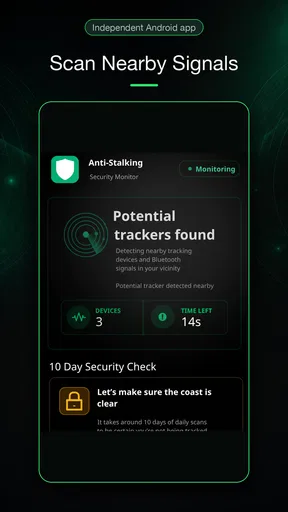
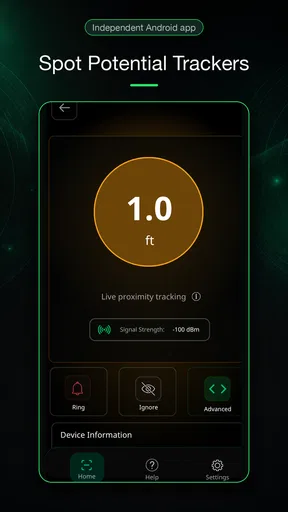
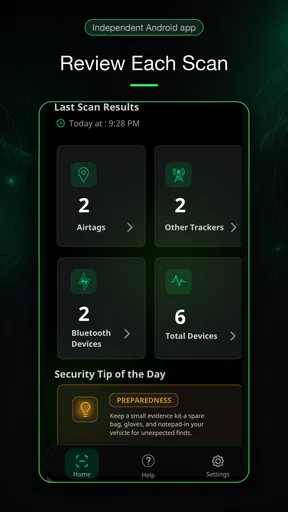
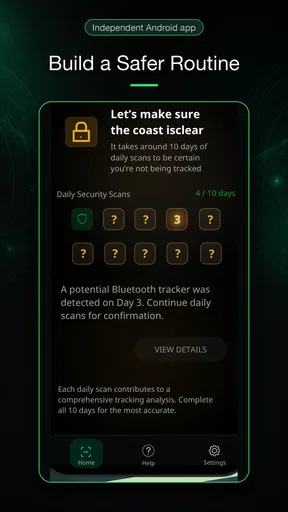
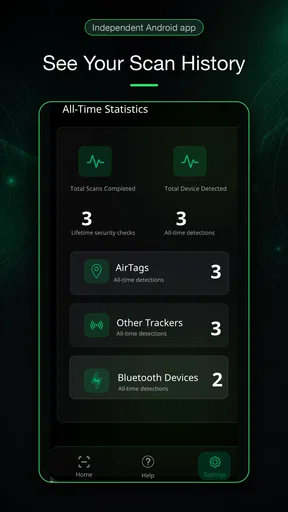
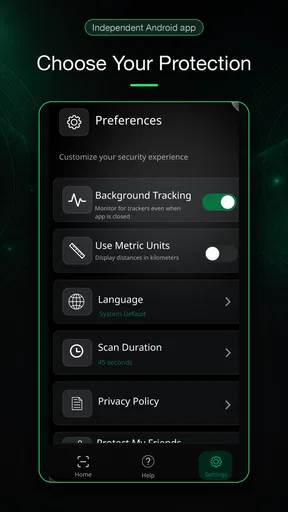
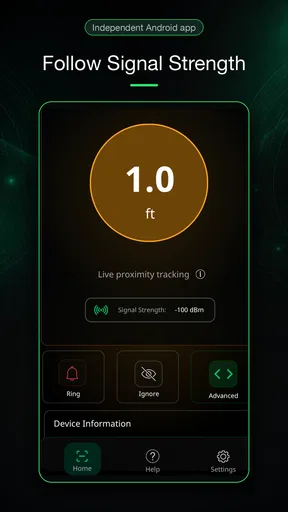
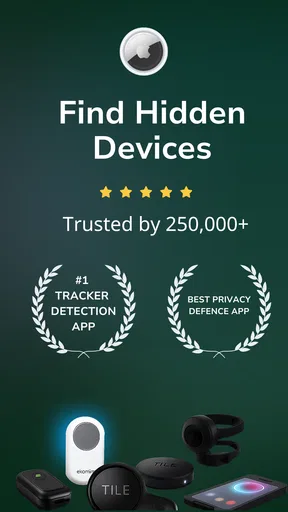
 Analysis by AppCompare
Privacy tools are easiest to judge when you are worried, distracted, or trying to use your phone in an unfamiliar place. I see Tracker Detect: AirTag Scanner as a focused Android utility for checking whether an unfamiliar tracker may be nearby, rather than an app that promises to solve every tracking concern. Its value is in giving you a way to look for certain Bluetooth devices and take a practical next step if one appears. That narrow purpose is useful, but it also means it is worth understanding what a scan can—and cannot—tell you before relying on it.
Getting to Know Tracker Detect
First off, let's talk about what Tracker Detect really is. This app is designed for Android users who want to keep tabs on any unwanted AirTags that might be following them. It's a pretty neat tool if you ask me, especially in a world where privacy is becoming a hot topic.
Once you fire up the app, it's all about simplicity. You don't need to be a tech whiz to navigate it. Just open the app, hit the scan button, and voilà! The app starts doing its magic, searching for any AirTags nearby. And trust me, it does it pretty darn fast.
Tag Tracker LLC makes this free Tools app, and its average rating is 4.9 from around 8,100 ratings, with about 731 written reviews and over 100,000 installs. It is rated for Everyone, and the current version is 9.0.8. The app first appeared on October 16, 2021, and requires Android 6.0 or later. The basic download costs nothing, though in-app purchases range from $1.99 to $119.99 per item. I would treat those purchases as a reason to check what is being offered before buying, rather than assuming every useful scan requires payment.
Features That Stand Out
One of the coolest things about this app is its ability to detect any AirTags that are separated from their owners. It doesn't just stop there; it even gives you the option to play a sound on the AirTag, making it easier to locate. Imagine hearing that little "ding" and finding the culprit hiding under your car seat!
Another feature worth mentioning is the app's straightforward interface. It's not cluttered with unnecessary buttons or confusing settings. Everything is laid out clearly, making the experience smooth and hassle-free.
That simplicity matters when you are using a privacy tool under stress. A person who has just found an unfamiliar object in a bag, or is worried after a late journey, should not have to decode a dense dashboard first. The direct scan-and-check approach lowers the amount of interpretation needed at the start. I would still pause over any result and consider the surroundings: a tracker detected nearby is a reason to investigate calmly, not proof by itself that someone has deliberately followed you.
Worth Reading Before You Choose

EA SPORTS FC Mobile 26 Is a Bigger Football Game, but It Takes Time

Flipboard Shows What News Apps Must Do Beyond the Feed

Switching to Android Auto Means Rethinking Your Driving Routine

Google Calendar Makes a Crowded Week Easier to Manage

Ludo King Makes the Most of the Minutes Between Plans

Baby Panda World Brings Quick Play to Modern Phones, but Its Game Library Feels Busy
Why You Might Need It
Now, if you're wondering why you might need Tracker Detect: AirTag Scanner, think about this: ever lose your peace of mind worrying that someone might be tracking you? This app puts that worry to rest. Whether you're traveling, on a night out, or just going about your daily life, having this app ensures your privacy is intact.
Plus, it's not just about AirTags. The app can also detect other Bluetooth trackers, expanding its functionality and usefulness. It's like having a multi-tool for digital privacy.
I would soften the promise of complete peace of mind: a scan is a useful check, not a guarantee that no tracking device exists. Bluetooth discovery depends on a device being detectable in the conditions around you, and a scan only tells you what the app can identify at that moment. If a result concerns you, repeat the check in a different place and look for a pattern rather than treating one isolated detection as a verdict. That distinction helps keep the app reassuring without making it a substitute for careful judgement.
Using the App: A Day in the Life
Imagine this scenario: You're out on a shopping spree, hopping from one store to another. You pull out your phone and launch Tracker Detect. In a matter of seconds, it scans the vicinity, keeping you informed about any unwanted trackers. It's that peace of mind you didn't know you needed but are so glad to have.
The app also sends you alerts if it detects an unfamiliar tracker moving with you over time. So, you can carry on with your day, knowing that Tracker Detect has got your back.
A more cautious everyday workflow is to scan when you have a specific reason, then note where and when a concerning result appears. If you are moving between a busy shop, a shared ride, and home, nearby devices may change simply because people and their belongings change around you. Checking again away from the original crowd can help you distinguish a passing nearby tracker from one that seems to remain with your belongings. I would avoid confronting someone based only on a phone result; first make sure you understand what object has been detected and whether it is actually traveling with you.
Readability, Navigation, and Different Abilities
The uncluttered layout described above is a genuine strength for people who prefer a direct task over menus and layered controls. A clear scan action can also be easier to follow for someone new to Bluetooth privacy tools, or for a friend helping another person check a device. Still, a simple interface does not automatically make every interaction comfortable for every user. Screen readability, touch accuracy, and the ability to interpret alerts can vary with vision, dexterity, language familiarity, and the phone being used.
If you have low vision, try the app on your own device before you need it urgently: check whether the labels remain legible with your usual display settings and whether you can locate the scan control without assistance. If small touch targets are difficult, taking a moment in a calm setting to learn the basic flow may reduce pressure later. I would also keep the phone’s ordinary accessibility settings configured the way you need them; a privacy scan is a poor moment to discover that the screen is hard to read or the controls are awkward to reach.
For sensory comfort, the sound option is practical when you are trying to locate a detected AirTag, but sound is not always the best choice. In a quiet public place it may draw attention, while a person who is hard of hearing may not be able to use an audio cue reliably. If you are checking in public, consider your surroundings before triggering a sound, and do not assume that an audible response is the only way to make sense of a result. The app is most helpful when its use fits the person and situation, rather than forcing everyone into the same workflow.
When a Scan Fits—and When It Does Not
This is a good tool to keep available if you use Android and want a straightforward way to investigate a specific concern, especially while traveling or after finding an unfamiliar item among your belongings. It may also be useful for someone who wants to help a less technical family member understand what a nearby tracker alert could mean. The app’s focused purpose is an advantage here: there is less to learn than with broad device-management or network-scanning utilities that try to cover many unrelated tasks.
It is not the right choice if you need a general inventory of every nearby Bluetooth device, a full security audit of your phone, or a dependable answer about who owns a tracker. Those are different questions. A phone’s built-in safety options, where available, can be a more convenient first check, while contacting someone you trust or local support may be more appropriate if you have a credible concern about being followed. Tracker Detect is a supplementary check, not an emergency service or a replacement for a safety plan.
There is also a practical trade-off in using a dedicated scanner: you need to remember to open it when you want to check, and a one-time scan is less informative than observing whether a device seems to stay with you. If you are in a hurry, do not let repeated scanning distract you from getting to a safer, more populated place. The app is most valuable as one step in a sensible response, not as the whole response.
Some Thoughts to Wrap Up
After spending some time with Tracker Detect: AirTag Scanner, I must say I'm impressed. It's a reliable companion for anyone concerned about their privacy. While it may not be a flashy app with tons of bells and whistles, it does exactly what it promises, and it does it well.
In a nutshell, if you're an Android user and want to keep unwanted trackers at bay, this app is a must-have. It's simple, effective, and gives you that extra layer of security we all crave in today's tech-driven world.
For me, its strongest case is a person who wants a low-friction way to check for AirTags and other Bluetooth trackers, understands that detections need context, and is comfortable using an Android phone to follow up. The usual alternatives—built-in phone safety checks or broader scanning tools—may suit someone better if they want a check integrated into everyday settings or a more general technical view. I would skip this app if you expect it to identify an owner, guarantee that you are not being tracked, or work as a complete answer to a serious personal-safety concern.
Ready to give it a try? You can find it on the Play Store. Go ahead, take control of your privacy, and keep those sneaky AirTags in check!
Pros
- Easy to use interface for quick scanning.
- Works well on both Android and iOS.
- Accurate detection of nearby AirTags.
- Simple setup with minimal permissions.
- No ads to interrupt scanning process.
Cons
- Limited to detecting only AirTags.
- Requires internet for full functionality.
- Occasional false positives in crowded areas.
- Limited support for older devices.
- No real-time alerts for detected tags.
FAQs for Tracker Detect: AirTag Scanner
What is Tracker Detect: AirTag Scanner used for?
Tracker Detect: AirTag Scanner is designed to enhance your privacy and security by identifying nearby AirTags that might be used for unauthorized tracking. It scans your vicinity for any stray or unknown AirTags, providing alerts and allowing you to take necessary actions if any suspicious device is detected.
How does Tracker Detect: AirTag Scanner work?
The app utilizes Bluetooth technology to scan for AirTags in your vicinity. Once it detects any AirTag, it will alert you with a notification. You can then explore options to play a sound on the detected AirTag to locate it or learn more about the device to ensure your safety.
Is Tracker Detect: AirTag Scanner compatible with all devices?
Tracker Detect: AirTag Scanner is primarily designed for Android devices. It requires Bluetooth capabilities to function effectively. Ensure that your device is updated to the latest Android version to guarantee compatibility and optimal performance of the app.
Does Tracker Detect: AirTag Scanner require internet connectivity?
No, Tracker Detect: AirTag Scanner does not require an internet connection to scan for AirTags. It operates over Bluetooth, allowing for offline detection. However, for app updates or additional features that might require cloud services, internet connectivity would be needed.
Is Tracker Detect: AirTag Scanner free to use?
Yes, Tracker Detect: AirTag Scanner is available as a free download. The app provides essential features at no cost to help you detect unauthorized AirTags. There might be optional in-app purchases or premium features available, but the core functionality remains free.


